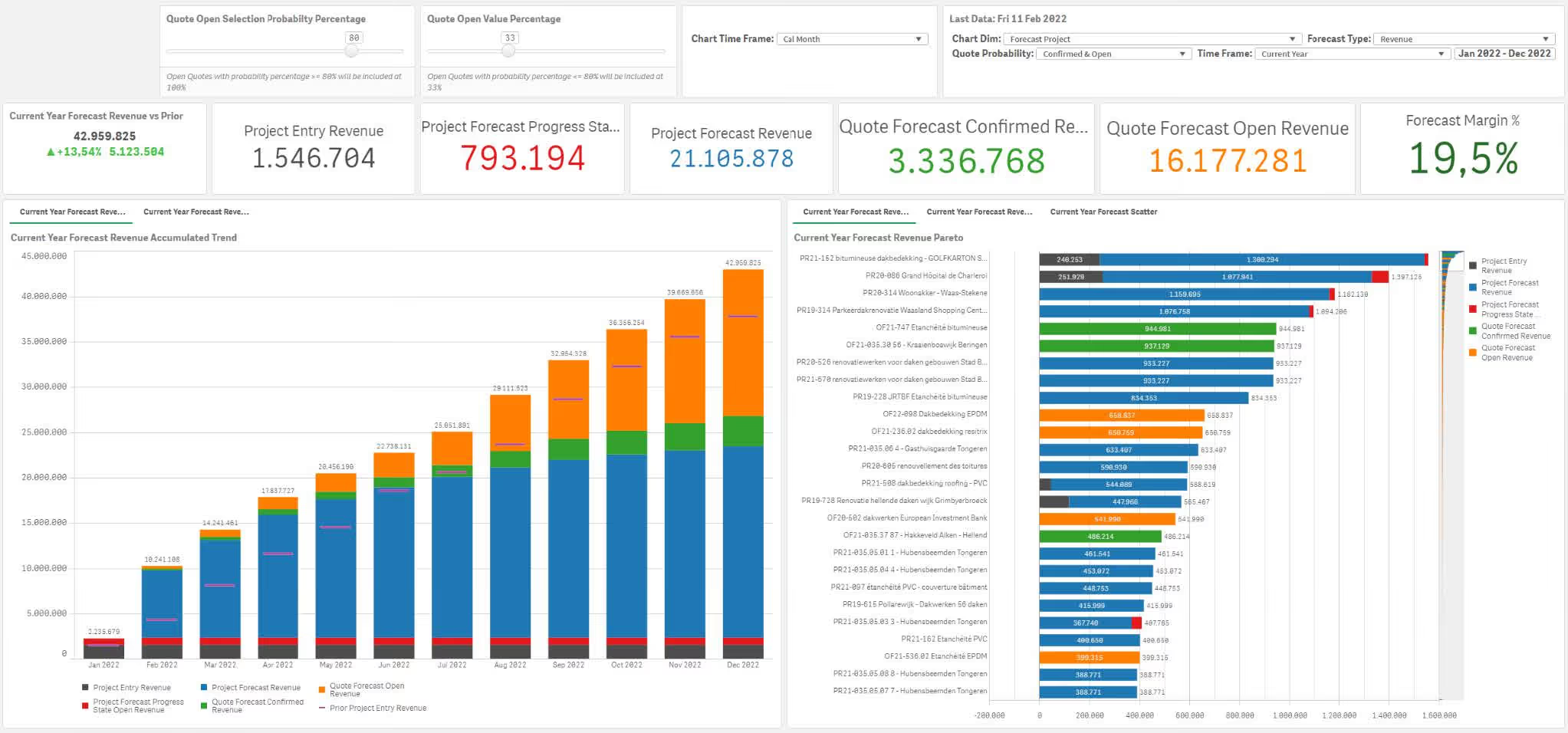
Full view of every project at all times — no detail is lost. With our user-friendly and transparent subsequent calculation, you can enjoy versatile insights from all possible angles, so that you can make both operational and strategic decisions based on facts rather than just intuitively.
We see at a glance how our costs and margins are evolving and thus make informed decisions and increase our profitability. By responding quickly and meticulously to changes, we ensure sustainable growth and increase our strength.

The cooperation with InsightData has made our business operations significantly more transparent; we now have a clear insight into all our processes and can respond to changes in the market more quickly, efficiently and flexibly.

The Project App helps project-driven companies better monitor project profitability, budgets, costs, revenue, progress and post-project costing. The App makes it clear which projects are profitable, which projects exceed budget and where deviations occur. This gives you faster control over project results instead of only discovering after completion that margin has been lost.
The Project App is suitable for companies that work with projects, sites, files, assignments or customer-specific trajectories. Think of construction companies, installation companies, engineering firms, machine builders, consulting companies, technical service providers and other organizations where costs, hours, materials and revenue must be tracked per project.
You get insight into project budgets, actual costs, revenue, margin, hours, material consumption, progress, invoicing, post-project costing and deviations between budget and reality. Depending on the available data, you can also analyze by project manager, customer, project type, department, site, region or phase.
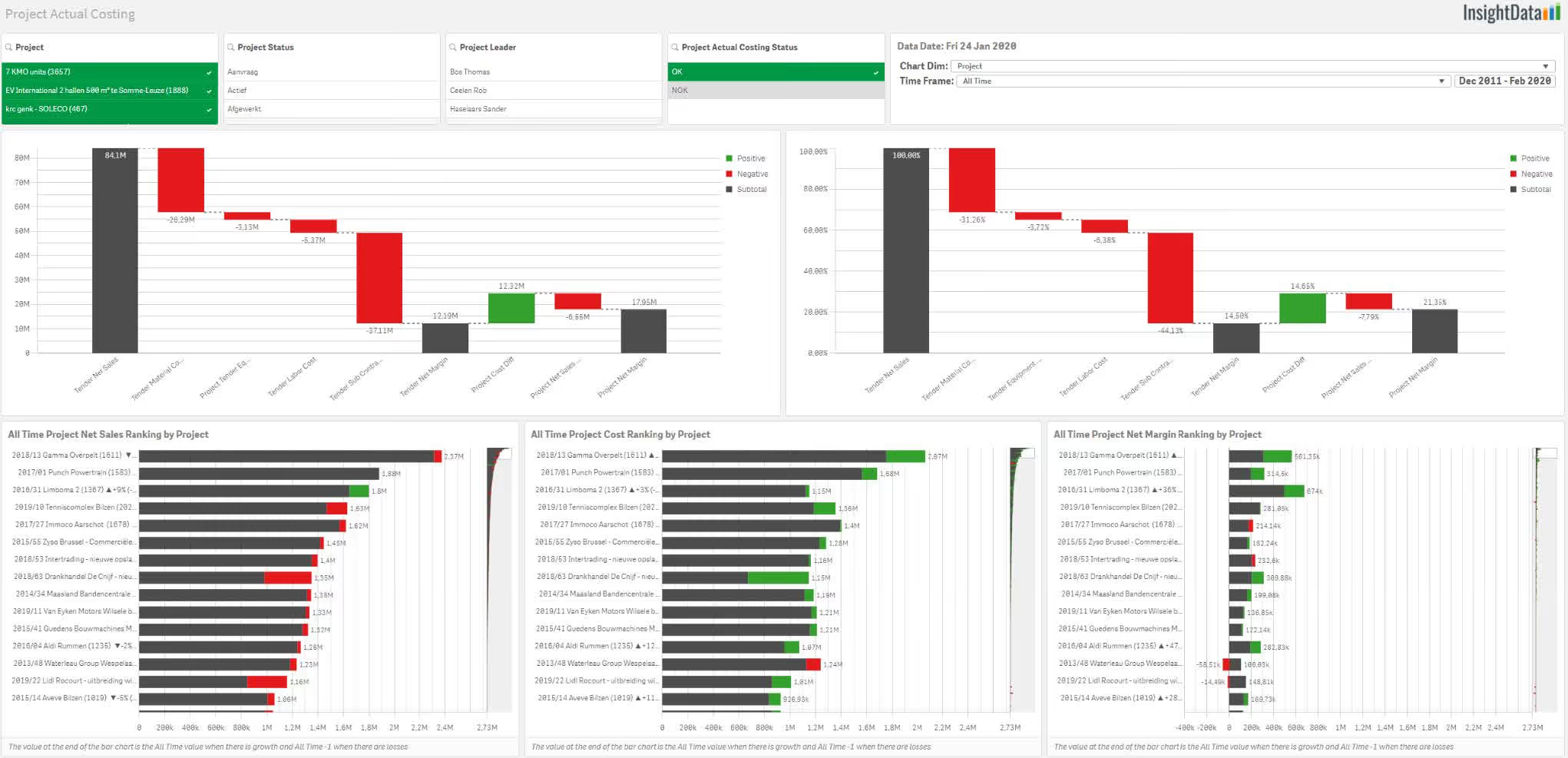
Yes. Project margin is one of the most important insights within project reporting. The App can show which projects are profitable, which projects are losing margin and which cost items are responsible. This allows you to intervene faster when hours, materials, subcontracting or other costs get out of hand.
Yes. The App can compare budgets with actual costs and revenue. This can be done at project level, but also by phase, cost item, activity, department or other dimension when that data is available. As a result, you see faster whether a project is financially on track or whether action is needed.
Yes. Post-project costing is an important application of the Project App. By comparing planned costs and revenue with the actual figures, you see where differences arise. These insights help not only to manage current projects better, but also to improve future quotes, calculations and planning.
Examples include project revenue, project costs, gross margin, margin percentage, budget deviation, invoiced amount, amount still to invoice, hours spent, material consumption, costs by project phase, progress and result by project manager. KPIs such as forecasted margin, work in progress and open project costs can also be relevant, depending on the data and processes.
Yes. By continuously monitoring projects, deviations become visible sooner. You do not have to wait until the project is fully completed. When costs rise faster than expected, invoicing lags behind or hours exceed budget, the App can make this visible. That gives project managers and management more time to adjust.
Typical data sources include ERP, project software, accounting, time registration, planning, invoicing, calculation systems and Excel files with budgets or forecasts. The exact data sources depend on how your company manages projects today and which systems are used for that.
You can make better decisions about which projects need extra follow-up, which project types are profitable, which customers or assignments structurally generate margin and where calculations need to be adjusted. The App helps project management, finance and the executive team work with the same figures.